
You are using an out of date browser. It may not display this or other websites correctly.
You should upgrade or use an alternative browser.
You should upgrade or use an alternative browser.
Foreflight opens up
- Thread starter Roger Roger
- Start date


ChasenSFO
hen teaser
I like that "Don't mistake for MSP".They look..........uh....
I hate NOS charts. Those make me want to punch a puppy.
View attachment 31164

thevideographer
Well-Known Member
Not sure what you mean by "... Have the charts redraw themselves", but Foreflight does everything else you mentioned.
I think by "redraw themselves" he means that as you zoom in and out, important information that you are looking for like MORAs will disappear and appear randomly at different zoom levels, so you're never sure if you're getting the whole picture. That app is basically unusable for enroute charts (and barely usable for approach charts).
KSCessnaDriver
Well-Known Member
Having messed around in ForeFlight some, used Garmin Pilot quite a bit and used FD Pro a bit, I'd take FD Pro of the bunch. I've yet to see it crash for some random reason, the other two, I have seen crash.
I think by "redraw themselves" he means that as you zoom in and out, important information that you are looking for like MORAs will disappear and appear randomly at different zoom levels, so you're never sure if you're getting the whole picture. That app is basically unusable for enroute charts (and barely usable for approach charts).
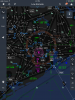
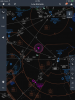
Actually, what I'm technically referring to are the vector-based maps that JeppFD employs, much like you'd experience on a Garmin 430, G1000, any other GPS units. ForeFlight and WingX simply use a scanned in image of a sectional or low/high enroute chart, while JeppFD programmatically draws the map.
The vector-based maps are far superior in detail and the amount of information they can present. They also allow the map to be oriented in any direction while still displaying the information oriented to the user. I've attached screen shots of what I'm referring to when zoomed out vs. zoomed in on the Houston metro in night mode.
Attachments

SlumTodd_Millionaire
Most Hated Member
I always use north-up, so never been an issue for me.
thevideographer
Well-Known Member
ForeFlight and WingX simply use a scanned in image of a sectional or low/high enroute chart, while JeppFD programmatically draws the map.
.
Actually this is no longer true, Foreflight has all digitital charts now and will rescale to TAC charts as you zoom in as well.
JeppUpdater
Well-Known Member
My company pays for my ForeFlight subscription and I still maintain my own Jepp subscription on my iPad. I much prefer the Jepp charts and rarely open ForeFlight honestly. I use FltPlan.com for planning - way more accurate than ForeFlight's planner. Like someone previously mentioned, I've had ForeFlight randomly crash before, and it's delay when opening the app or powering up the screen is annoying.
I did see something in the ForeFlight update yesterday about them starting to only update the charts that change. That will be a huge improvement over the absurd downloads right now.
I did see something in the ForeFlight update yesterday about them starting to only update the charts that change. That will be a huge improvement over the absurd downloads right now.

poser765
Well-Known Member
Yeah as I was looking at that thing my left eye starting to twitch trying to think about how to brief that thing.And briefing from a LIDO plate? Terrible. I used them for a year at 9E.
I'll take my briefing strip(tm), please.

ppragman
No pasa nada.
Huh. Never seen a lido chart before. Pretty slick.
That chart made me feel violently ill. How the hell do you even brief it? "Uhh, we'll start over here, the go to the bottom, then go up to the top, then draw a squiggly "S" through the rest of the chart and that's everything you need to know."
The symbology and layout is bad, and LIDO should feel bad.
Actually this is no longer true, Foreflight has all digitital charts now and will rescale to TAC charts as you zoom in as well.
Correct, ForeFlight now uses aeronautical raster charts (a digital image of an FAA VFR Chart). These are great and much more crisp than the former scanned charts. But these still differ from the JeppFD vector-based maps, which are compiled by the software on the fly--there is no underlying base imagery file.

PositionAndHold
Well-Known Member
Which I find to be the thing that slows down JeppFD. All of that enroute chart rendering takes a ton of memory. I'd rather look at the scanned chart than some wierd thing that you can turn parts on and off. Where's that intersection? Oh yeah I turned "intersections" off accidentally. If I want to look at a sectional on ForeFlight, I know I'm looking at a sectional, not their version of a sectional.Correct, ForeFlight now uses aeronautical raster charts (a digital image of an FAA VFR Chart). These are great and much more crisp than the former scanned charts. But these still differ from the JeppFD vector-based maps, which are compiled by the software on the fly--there is no underlying base imagery file.
Which I find to be the thing that slows down JeppFD. All of that enroute chart rendering takes a ton of memory. I'd rather look at the scanned chart than some wierd thing that you can turn parts on and off. Where's that intersection? Oh yeah I turned "intersections" off accidentally. If I want to look at a sectional on ForeFlight, I know I'm looking at a sectional, not their version of a sectional.
It's no different than flying with a G1000 or any TAA with a moving map using this same technology. That's certainly not for everyone, especially without good training on proper use.
PositionAndHold
Well-Known Member
Admittedly, I have little to no experience with the G1000. As far as I know those moving maps aren't trying to replicate an existing chart. They display airspace/airways etc but if you want to look at a high altitude/sectional that's another screen. The JeppFD is supposed to be replicating and existing chart, high and low altitude, but they add all those features you don't need. In ForeFlight you can choose to overlay certain info on a regular chart, like terrain awareness. The chart it self always stays the same though.It's no different than flying with a G1000 or any TAA with a moving map using this same technology. That's certainly not for everyone, especially without good training on proper use.

jwp_145
GhostRider in the Sky
Even if you are looking at a paper Jepp chart it is still their "version" of the chart as they draw it from the TERPS geodata.Which I find to be the thing that slows down JeppFD. All of that enroute chart rendering takes a ton of memory. I'd rather look at t he scanned chart than some wierd thing that you can turn parts on and off. Where's that intersection? Oh yeah I turned "intersections" off accidentally. If I want to look at a sectional on ForeFlight, I know I'm looking at a sectional, not their version of a sectional.
When Jepp electronic charts first came out the file size was MASSIVE because they just scanned the paper charts and supplied them as a bitmap image, albeit a high quality bitmap image... it wasn't until later that they started using .eps vector files, or whatever format they use, maybe .svg...
PositionAndHold
Well-Known Member
I think I explained it wrong. A paper chart is a paper chart. You can't turn airspace, airways, nav aids and airports off. On JeppFD you can "declutter" all of those. It's a feature that takes a ton of memory and is just about unnecessary. I'd rather just look at the paper version but on my iPad, just like the approach plates.Even if you are looking at a paper Jepp chart it is still their "version" of the chart as they draw it from the TERPS geodata.
When Jepp electronic charts first came out the file size was MASSIVE because they just scanned the paper charts and supplied them as a bitmap image, albeit a high quality bitmap image... it wasn't until later that they started using .eps vector files, or whatever format they use, maybe .svg...

Richman
JC’s Resident Curmudgeon
FWIW, Garmin Pilot has a vector based map as one of the overlays. Pretty nifty, and you can tailor it and tweak it to your hearts content.
That said, if my GDL39 would work with Foreflight, I'd probably switch back.
Honestly, to me, Jepps or NOS is six of one, half dozen of the other. Might as well talk about Ford or Chevy, Coke or Pepsi.
Richman
That said, if my GDL39 would work with Foreflight, I'd probably switch back.
Honestly, to me, Jepps or NOS is six of one, half dozen of the other. Might as well talk about Ford or Chevy, Coke or Pepsi.
Richman