Airspace 3d augmented review for fellow pilots

Ncm722

Active Member
During my time at ATP, I wished there were a better way to visualize airspace beyond a flat sectional chart.

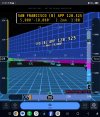
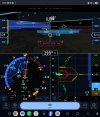
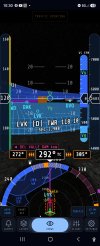
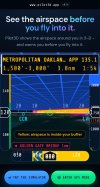
Toward the end of my training, I started developing Pilot3D, a free tool that visualizes airspace in 3D in real time.

The goal is to help pilots better understand where they are, what airspace they're in, and what's around them.

I've attached a screenshot to give you a look at what I've been working on. I'd love to hear feedback from fellow pilots, CFIs, and DPEs. What features would you find most useful?
 

Attachments

  • Screenshot_20261026_010946_Chrome.jpg
    Screenshot_20261026_010946_Chrome.jpg
    218.8 KB · Views: 72
  • Screenshot_20261025_234144_Chrome.jpg
    Screenshot_20261025_234144_Chrome.jpg
    452 KB · Views: 68
  • Screenshot_20261025_231330_Chrome.jpg
    Screenshot_20261025_231330_Chrome.jpg
    403.6 KB · Views: 62
  • Screenshot_20261025_223045_Chrome.jpg
    Screenshot_20261025_223045_Chrome.jpg
    297.4 KB · Views: 73
Interesting idea, and while airspace isn't simple - it isn't the most difficult thing we have to understand. I think this adds unnecessarily complex distractions.

1793230515790.png
 
i don’t understand what the point of this is, are you playing tron in flight with a yoke ipad or is this a ground training tool
 
Outside of primary flight training once you start flying anything with a turbine engine you don’t really care about airspace.

i mean we do care about airspace but not really. Only time I might care is when NorCal drops us below the B floor and I might spend some brainpower to remember that I should probably slow to 200.. but too much effort to remember that and we just keep flying our 250. And it turns into a TMAAT you violated a FAR…
 
Outside of primary flight training once you start flying anything with a turbine engine you don’t really care about airspace.

i mean we do care about airspace but not really. Only time I might care is when NorCal drops us below the B floor and I might spend some brainpower to remember that I should probably slow to 200.. but too much effort to remember that and we just keep flying our 250. And it turns into a TMAAT you violated a FAR…
I see you too have flown into OAK and SJC
 
Thanks for taking a look, everyone. To answer the question: it's meant mainly for ground training and preflight, not for staring at in the cockpit. The idea is to picture the shelves before a flight, especially for student pilots who are still learning to read a sectional. Fair point that it's not something airline crews need day to day. It's advisory only and not for navigation, so the official charts and your EFB always come first. If anyone tries it and something looks off, Settings > Send feedback in the app goes straight to me."

I have made several changes to the online app which can be found here pilot3d.app
 
Back
Top