The Whipping Post

Any of you guys use Aperature from Apple?

Shopping for a Mac Book as a self present for graduation, and noticed that that was their photo editing software.

Currently I'm using GIMP.
 
Great idea! Love shots back lit like this, I am planning to start shooting some of my bride & grooms with back lit flash/sun when I can. The one thing that would have really helped the shot would have been some fill flash. Did your flash happen to fire? Doesn't appear so by looking at it, but it can be hard to tell.

3 flashes would have done this shot amazingly well, if you had the equipment at the time ;) That said, you can add some fill flash in CS3. Look for some actions that are labeled 'fill flash' out on the interwebz to help you out. If not, I can try to play around with it in a few days if you don't mind. Just got home from a looong 4 day and time to head to the mountains :)


Thanks for the advice, slowly getting there I think...I don't know how to make the edges as defined as they should be though.

cirrusflashcopy.jpg
 
IMGP1381.jpg


I took this last summer in Boston. I know it's a little bright, but go ahead and let me have it. Camera is a Pentax K100D with 18-55mm lens. Not one of my greatest photos, just think it's kind of cool.
 
IMGP1381.jpg


I took this last summer in Boston. I know it's a little bright, but go ahead and let me have it. Camera is a Pentax K100D with 18-55mm lens. Not one of my greatest photos, just think it's kind of cool.


Moving the flash away from the camera may help with the "brightness", but otherwise I think the contrast is good with good sharpness. The level of detail is amazing. Good shot!
 
I just got my camera a couple of weeks ago and finally started playing with it. Tried to set up this simple still, but for some reason could not get rid of the glare on the glass table in the background or on the beans themselves. When composing the shot I didn't see it that way, but obviously the eye resolves the contrast differently than the lens. I'm a beginner, I guess I expect too much :dunno:


4274515442_f99060feb4_b.jpg


Camera: Canon EOS REBEL T1i
Exposure: 0.077 sec (1/13)
Aperture: f/5.6
Focal Length: 53 mm
ISO Speed: 400
Exposure Bias: 0 EV
Flash: Off, Did not fire
 
Yes... used the basic B&W preset, messed around with the clarity slider and cranked the noise removal to 100.

Hey do you have any recommendations on "how-to" articles about doing HDR photos? Particularly for someone that is clueless. :o
 
Hey do you have any recommendations on "how-to" articles about doing HDR photos? Particularly for someone that is clueless. :o

Take a look at www.stuckincustoms.com. He's got a great tutorial on his site. Heh. I keep plugging this guy on HDR work and I'm thinking that I should start getting a cut from him! He's also a published author on... you guessed it... HDR.
 
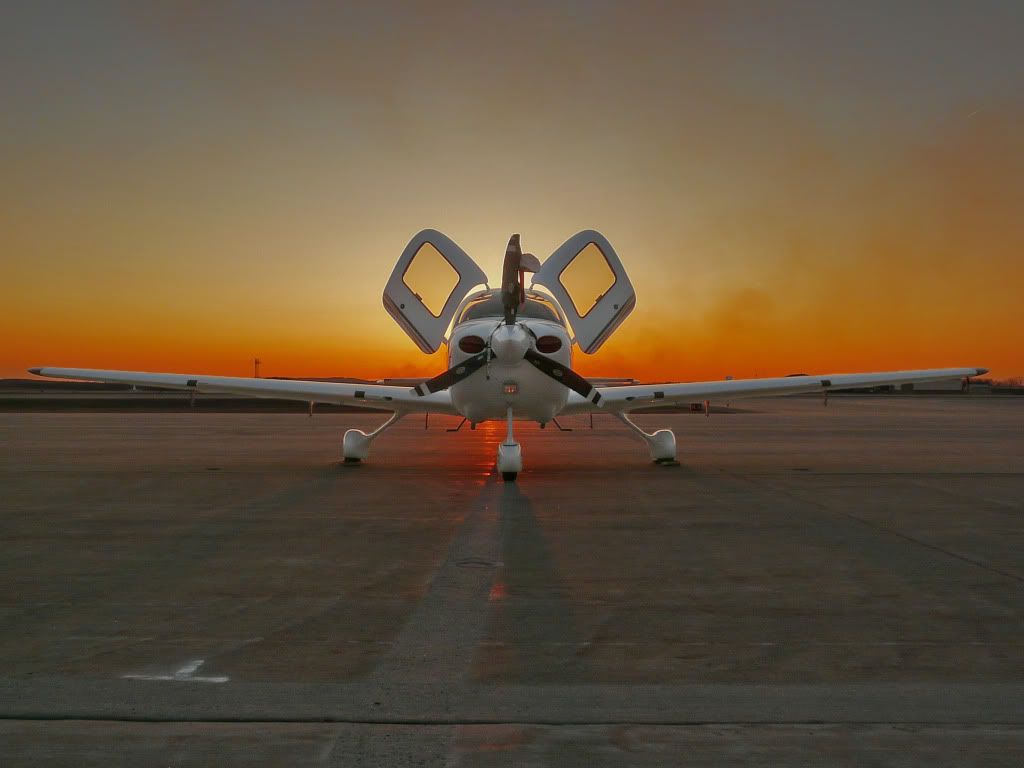
Here's one for the whipping post:
4325915862_4896508c19_b.jpg


1/400
f/5
92mm focal length
ISO 200

Minimal editing in GIMP - unsharp mask and some contrast with color curves.
 
Alright guys, go easy. Just got my first camera and trying to do some cool things. Nothing post on this one because i dont know how...
ISO 80
1/640
F8.0
Cannon Powershot SX 200 IS
P.S. How do I make it the full pic and not the thumbnail?
 

Attachments

  • IMG_0728.jpg
    IMG_0728.jpg
    259.4 KB · Views: 126
to post a larger size, host it elsewhere.

for example: flickr.com, photobucket.com, or the like. most are free, but offer premium services for a fee. i prefer flickr.com.

then once you upload it to your account there, copy+paste the link on here.

if the site you choose doesn't have an automatic or obvious way to copy and paste the link, upload your pic, right click properties. you should see a box labeled "location". copy+pate that here, in between image tags like this-


on flickr the pic location is listed under "grab your photo's url" or something similar. after copy+pasting that here, just make sure you have the image tags around it like above, with no spaces.

hope that makes sense.
 
Alright guys, go easy. Just got my first camera and trying to do some cool things. Nothing post on this one because i dont know how...
ISO 80
1/640
F8.0
Cannon Powershot SX 200 IS
P.S. How do I make it the full pic and not the thumbnail?

forgot about the whipping part. i'd suggest watching the composition a bit closer. obviously the light is cool, but the chair in the lower right and the roof overhang or whatever it is in the upper right detracts from it.
 
Any of you guys use Aperature from Apple?

Shopping for a Mac Book as a self present for graduation, and noticed that that was their photo editing software.

Currently I'm using GIMP.

No Aperture use from this Apple guy. Lightroom + Photoshop for me. I have heard good things about Aperture though FWIW.
 
forgot about the whipping part. i'd suggest watching the composition a bit closer. obviously the light is cool, but the chair in the lower right and the roof overhang or whatever it is in the upper right detracts from it.

+1

Work on your composition technique a bit more and you will be coming right along. As you frame the photo ask yourself what you are trying to convey with the picture. Then frame it and look for distractions [chair] and elements that you like [lighting].
 
Thanks for the advice, slowly getting there I think...I don't know how to make the edges as defined as they should be though.

cirrusflashcopy.jpg

Here is my take...

780345853_GQsEF-L.jpg


I very quickly [and poorly] used some fill flash on the place and made a tighter crop. I found the foreground to be a bit distracting once I took another look at it.

Great shot either way :)
 
Here's one for the whipping post:
4325915862_4896508c19_b.jpg


1/400
f/5
92mm focal length
ISO 200

Minimal editing in GIMP - unsharp mask and some contrast with color curves.

Overall neat concept & great use of the unsharp mask here. I think cutting off the tires doesn't do it any justice though. I have taken many shots that I thought were great only to find out later that I cropped out an important part of the subject. :banghead: There are some general rules of thumb to be used (and broken) about cutting off your subject's parts. Here I think the tires needed to be there. The imagination works fine I think for the rest of the wings, but if the entire front of the a/c were visible I think it would help the picture a lot.
 
Another offering...

Mule deer from Rocky Mountain National Park this week...

780515144_3stnh-XL.jpg


f/5.6
1/400
ISO 250
+1/3 EV
focal length 300mm
post in LR2 - contrast, levels, vignette, saturation, crop, blacks
 
Another offering...

Mule deer from Rocky Mountain National Park this week...

780515144_3stnh-XL.jpg


f/5.6
1/400
ISO 250
+1/3 EV
focal length 300mm
post in LR2 - contrast, levels, vignette, saturation, crop, blacks

i like the background better than the one in the daily pic thread. it was a shame that one's rack blended in so well with the background.

i'd tone down the vignette a bit, otherwise looks good.
 
Overall neat concept & great use of the unsharp mask here. I think cutting off the tires doesn't do it any justice though. I have taken many shots that I thought were great only to find out later that I cropped out an important part of the subject. :banghead: There are some general rules of thumb to be used (and broken) about cutting off your subject's parts. Here I think the tires needed to be there. The imagination works fine I think for the rest of the wings, but if the entire front of the a/c were visible I think it would help the picture a lot.

Thanks! Unfortunately there were some undesirable aspects of the shot if I included the bottom of the tires and I was trying to avoid them. It wasn't my plane and the owner wasn't around so we could move it to a better location. Basically, I was just walking down the row and thought it was a nice looking cub... minus the bird droppings on the prop of course.
 
Back
Top